UX Research Sprint for SaaS

Fix drop-offs, increase activation, and improve conversion in 1–2 weeks.
A focused UX audit sprint with real users.
Includes usability testing to uncover real behavior. Built for SaaS teams that need answers fast.


Your product ships fast. Users don’t use it.

This gap directly impacts conversion, retention, and revenue.

You release features, improve UI, iterate on flows — but behavior doesn’t change. Users struggle to understand how the product works, key features remain underused, conversion rates stay lower than expected, and onboarding creates friction and early drop-offs.

From the inside, everything looks reasonable. From the user’s perspective, something breaks.

UX research and usability testing make that visible, as consistently shown in usability research by Nielsen Norman Group.


What’s actually happening

Here’s how this typically shows up in product metrics — and why it directly connects to the issues above.

Users sign up but don’t activate. They try the product but don’t return. Traffic increases, but conversion doesn’t follow.

This is not a growth problem. It’s a usability problem.

Until you see how real users interact with your product, you’re optimizing blindly — a limitation highlighted by frameworks like Google’s HEART model.


Internal feedback is limited. Real users are not.

Most product decisions are based on:

  • team assumptions
  • internal testing
  • analytics without context

A UX audit alone can highlight issues — but it still reflects an expert perspective.

Real users behave differently.

We run rapid UX research with target users to uncover where they hesitate, what they misunderstand, where they drop off, and what they expect but don’t find.

The result is not opinions, but observed behavior you can act on — a core principle in qualitative UX research.


One-time UX Research Sprint

Know exactly what to fix next.

A focused, fixed-scope engagement designed to quickly identify usability issues and conversion blockers.

No retainer. No long process. No unnecessary overhead.

Research Sprint — $400

You get a clear understanding of what blocks users — and what to fix next.

Typical output includes annotated flows, screen-level issues, and a prioritized fix list.

Includes usability testing sessions with real users, user journey and flow analysis, a structured UX audit report, a prioritized list of issues, and actionable recommendations for improvement.

The structure of this sprint follows established UX research methods used in industry practice.


How it works

A simple process designed for speed and clarity:

  1. Define key user flows (onboarding, activation, conversion)
  2. Run usability testing with target users
  3. Analyze behavior and identify friction points
  4. Deliver a UX audit with clear, prioritized fixes

No unnecessary steps. No overproduction.


When this makes the most impact

This sprint is most useful when users sign up but don’t activate, traffic grows but conversion doesn’t follow, or features are built but rarely used. It is also relevant when you’re preparing for a redesign or need validation before investing in development.

If something feels off but you can’t clearly explain why — this is the right moment.


When this is not the right fit

This format is not designed for:

  • full product redesigns from scratch
  • long-term or continuous research programs
  • large-scale quantitative validation

It is a focused diagnostic sprint, not a full product engagement.


FAQ

How many users do we need for usability testing?

For most SaaS products, 3–5 users are enough to uncover the main usability issues.

This approach aligns with established UX research practice showing that a small number of users can reveal the majority of usability issues.

The goal is to identify friction quickly, not to produce statistical significance.

Can usability testing be done asynchronously?

Yes. Async testing is faster and more cost-efficient. Live sessions are useful when you need deeper insight into user behavior — hesitation, confusion, or trust.

What do you need to start?

A product link, a short description of your target users, and 1–3 key flows to evaluate. If you invite users yourself, you’ll use a simple message template.

What exactly do I get at the end?

A structured UX audit report with clear findings, prioritized issues, and specific recommendations you can act on immediately.

Do you also implement fixes?

Not within the sprint. Implementation can be added separately if it makes sense after reviewing the findings.

How is this different from a UX audit?

A standard UX audit is expert-driven. This sprint combines audit methods with real user testing, so decisions are based on actual behavior.

How is this different from hiring a UX agency?

This is faster, more focused, and fixed in scope. No retainer, no long onboarding — just clear insights and next steps.

Is this suitable for SaaS products?

Yes. It is designed specifically for SaaS and digital products where onboarding, activation, and conversion flows matter.

How long does it take?

Typically 1–2 weeks, depending on scope and user availability.

Is “Send a link” a free audit?

No. You receive a short, structured response with suggested scope and next steps — not a full audit.

When should I not use this?

If you need continuous research, deep quantitative analysis, or a full redesign process, this format will be too limited.


Fix what blocks your users — before you scale the problem

Run a sprint. Review real sessions. Prioritize fixes.

You don’t need more features. You need clarity.

See how users actually behave. Identify what breaks. Fix what matters.

Start with a focused UX research sprint.
Because of my work, I spend a lot of time reviewing websites across very different industries.

And lately I keep noticing the same pattern:

many business owners have stopped paying enough attention to the aesthetics and usability of their websites.

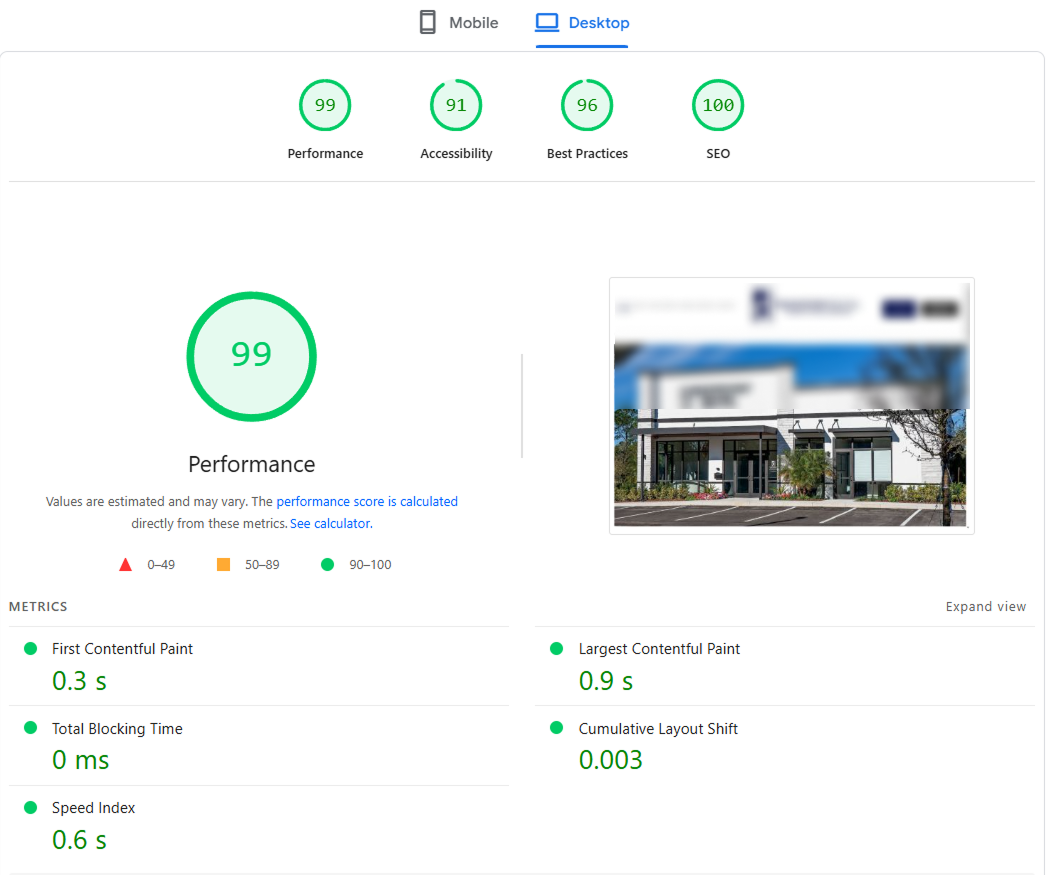
Yes, their performance scores are pushed to the limit. The numbers look great in tools like PageSpeed Insights.

Google Lighthouse desktop audit screenshot showing a website with a 99 performance score, 91 accessibility, 96 best practices, and 100 SEO
Strong technical scores do not always guarantee a smooth user experience.

But when I actually try to use some of these websites as a visitor, the experience is often confusing and frustrating.

And this is coming from someone who works in the field and understands how websites are usually structured.

That is not professional bias, and it is not about wanting everything to look the same.

I value variety. Years of work have simply given me a trained eye for what feels clear, intuitive, and trustworthy.

Some business owners focus so much on technical performance and optimization that they forget one simple thing: websites are used by people, not by machines.

My advice is simple. Spend a little time using your own website as if you were a real customer. Even better, ask someone unfamiliar with your business to go through the full journey. Let them search, click, read, hesitate, and try to complete an action. You will quickly see how strong your customer path really is, and where people may drop off.

Of course, not every website has this problem. Many are clear, attractive, and easy to navigate. But there are still plenty of highly optimized websites with confusing user flows and weak structure.

So here is the reminder:

clarity and visual quality are not decoration.

They are part of your sales process. They help build trust, reduce friction, and protect conversions.

Do not build only for search engines. Build for the people who actually need to use your business.

Your website is not a business card anymore. In 2026, it is part of the business itself.

A commercial website today is judged in seconds.

Not only by how it looks, but by how clearly it explains the offer, how confidently it presents the business, how fast it works on mobile, and how natural it feels to take the next step — send a request, book, call, or trust the company.

A lot of businesses still have this gap: the business is stronger than the website.

  • The service may be excellent.
  • The team may be experienced.
  • The reputation may already be there.

But the website still looks:

  • outdated
  • hard to scan
  • unclear on mobile
  • visually weak
  • or simply less trustworthy than the business behind it

And this matters.

Because in 2026, a website does not have to be flashy – but it does have to feel alive, current, clear, and technically reliable.

Business website checklist: what matters most in 2026

Mobile-first credibility

For many visitors, mobile is the first and only version they see.

If the website feels awkward, slow, cramped, or confusing on mobile, trust drops immediately. A business website in 2026 must feel natural to use on a phone, not just “acceptable enough.”

Clear first impression

A visitor should understand within seconds:

  • what the business does
  • who it helps
  • why it looks trustworthy
  • what to do next

If the homepage fails here, the rest of the website may never get a chance.

Visual order and structure

This is not about beauty for its own sake. It is about clean hierarchy, spacing, readable sections, and a layout that makes the business look organized and real.

A messy or unclear website often makes the business itself feel less reliable.

Technical confidence

Broken sections, outdated forms, slow pages, layout issues, and poor responsive behavior all signal neglect.

And neglect online often feels like risk offline.

Why mobile-friendly design affects trust immediately

A mobile-friendly website is no longer a bonus. It is part of basic credibility.

For many businesses, especially service businesses, the mobile version is where the first impression happens. If the text is cramped, buttons are awkward, sections feel broken, or the page is slow, the visitor does not think “this website needs work.”

They think: this business may not be fully reliable.

That is why mobile readability, spacing, speed, and clarity now directly affect trust.

Minimum steps to make a commercial website feel working and trustworthy

If you are not ready for a full redesign, start here:

  • review the homepage first
  • make the main offer easy to understand
  • improve mobile readability and spacing
  • check contact, booking, or inquiry flow
  • remove outdated or cluttered sections
  • fix broken visual hierarchy
  • make sure the site feels maintained, not abandoned

Sometimes that alone is enough to close the gap between a strong business and a weak website.

A working website in 2026 should not create doubt.

  • It should support trust.


A better website is not always about doing more.

  • Often it is about making the right things clearer, cleaner, and easier to trust.


  • FastRedesign
  • Website Review, Homepage Refresh & WordPress Cleanup for service businesses
  • fastredesign.com

When it comes to designing exceptional user experiences (UX), pricing plays a critical role. At FastRedesign, we’re committed to providing transparent and effective UX pricing solutions. In this guide, we explore the best practices and the importance of UX research in determining the right pricing strategy for your UX and UI projects.

What is UX Pricing?

UX pricing, short for User Experience pricing, encompasses the cost of designing and optimizing a user-centric interface that enhances user satisfaction. It combines UI and UX design elements to create an intuitive and appealing digital experience.

The Value of Proper UX Pricing

Effective UX pricing isn’t just about cost; it’s about value. When done right, it can lead to increased customer satisfaction, higher conversion rates, and better business outcomes.

Pricing UX Best Practices

Implementing best practices in UX pricing is crucial for success. Here are some key principles:

  • Transparency: Clear communication of pricing details ensures trust and a better client experience.
  • Value-Based Pricing: Aligning pricing with the perceived value of the UX improvements.
  • Project Scope: Tailoring pricing to the specific needs and complexity of the project.
  • User Research: Integrating UX research to inform pricing decisions.

The Role of UX Research in Pricing

UX research is the foundation of pricing decisions. It involves gathering insights from users to understand their needs, preferences, and pain points. Incorporating user feedback in your pricing strategy allows you to create tailored solutions.

Pricing Models for UX and UI

There are various pricing models to consider, such as hourly rates, fixed project fees, and performance-based pricing. Our team can help you choose the one that best suits your project.

Our UX Pricing Process

At FastRedesign, we follow a well-defined UX pricing process. It starts with understanding your project, conducting thorough research, and tailoring the pricing structure accordingly.

Why Choose FastRedesign?

We’re not just experts in UX and UI; we’re experts in delivering value through fair and transparent pricing. Our commitment to user-centered design ensures that your investment results in exceptional user experiences.

Contact Us for Custom UX Pricing Solutions

When it comes to UX pricing, it’s not just about numbers; it’s about crafting experiences that resonate with your users. At FastRedesign, we believe that the right pricing strategy can make all the difference in creating remarkable digital journeys.

By following best practices and incorporating insights from UX research, you can invest wisely in your projects. This investment results in experiences that not only meet but exceed user expectations. We’re here to help you navigate the complexities of UX pricing and ensure that your investment brings value to both your users and your business.

Get in touch with us at FastRedesign, and let’s embark on a journey to transform your digital experiences through thoughtful UX pricing. Your users will thank you for it, and your business will reap the rewards. Or use our pricing calculator.

In UX design, “dark patterns” have become infamous. They’re deceptive design tricks that steer users into undesirable actions, often benefiting the site or app but hurting the user. While they can offer short-term gains, they damage trust and have lasting negative effects. Here, we’ll delve into dark patterns in UX and why redesigning them is crucial for ethical and user-friendly design.

Understanding Dark Patterns in UX design

Dark patterns come in various forms and can be found across websites and apps. Some common examples include:

  1. Misdirection: This involves using visuals or language to direct users toward a particular action, often making it difficult for them to find alternative choices.
  2. Hidden Costs: Concealing or downplaying additional charges during the checkout process, only revealing them at the last moment.
  3. Roach Motel: Making it easy for users to sign up but incredibly difficult to cancel a subscription or account.
  4. Sneak into Basket: Adding items to a user’s shopping cart without their consent, hoping they won’t notice.
  5. Confirmshaming: Guilt-tripping users into taking a particular action, such as signing up for newsletters.


Sears.com: This modal includes a classic example of a manipulink. A prompt, Enter your email to get started is followed by two “creatively” labeled options: Show Me The Deals, and the manipulink, No thanks, I don’t like deals. The text actually stating that users will receive promotional emails is the least noticeable on the page.
Sears.com: This modal includes a classic example of a manipulink. A prompt, Enter your email to get started is followed by two “creatively” labeled options: Show Me The Deals, and the manipulink, No thanks, I don’t like deals. The text actually stating that users will receive promotional emails is the least noticeable on the page. Read full article – By Kate Moran and Kim Salazar


Who uses dark patterns

Dark patterns are used by many, intentionally or not, to meet specific goals, often harming the user’s experience. Some do it knowingly to deceive or manipulate, while others do it unintentionally due to design mistakes. Here are some examples:

  1. E-commerce Websites: Online retailers may use dark patterns to encourage users to make more purchases, sign up for newsletters, or opt for costly add-ons during the checkout process.
  2. Subscription Services: Some subscription-based services may make it challenging for users to cancel their subscriptions or hide important terms and conditions.
  3. Social Media Platforms: Social media platforms may employ dark patterns to increase user engagement, such as by sending frequent notifications, making it difficult to disable certain features, or using persuasive design to keep users scrolling for extended periods.
  4. Email Marketers: Marketers may use confirmshaming techniques in email opt-in forms to guilt users into subscribing to newsletters or promotional emails.
  5. Gaming Apps: Mobile games may use dark patterns to encourage in-app purchases, such as by making it frustratingly difficult to progress in the game without spending money.
  6. Privacy Settings: Some apps and websites may use confusing or misleading language in their privacy settings to get users to share more personal information than they intend.
  7. News Websites: Online news outlets might use misleading headlines, clickbait, or deceptive layouts to drive more clicks and ad revenue.
  8. Financial Services: In the finance sector, dark patterns could be used to hide fees or make it difficult for users to access essential information about their accounts.
  9. Government Websites: Even government websites have been criticized for using dark patterns in the past, such as making it hard to opt-out of data sharing or find critical services.
  10. Startups and Smaller Businesses: Some smaller organizations, in their pursuit of rapid growth, may resort to dark patterns unintentionally, driven by a desire to increase conversion rates and user engagement without fully understanding the ethical implications.

The Problem with Dark Patterns

Dark patterns undermine the principles of ethical design and user-centricity that should be at the core of every UX project. They manipulate users, erode trust, and can even lead to legal repercussions for organizations that employ them. In a digital age where user trust is paramount, dark patterns can do irreparable damage to a brand’s reputation.

Moreover, dark patterns can create a frustrating user experience. Users who feel deceived or forced into actions are unlikely to return to a website or app, resulting in lost potential customers and revenue.

The Ethical Imperative: Redesigning Dark Patterns

Redesigning dark patterns is not only an ethical imperative, but also a smart business decision. Here are some steps to consider when embarking on this essential journey:

1. Educate Design Teams

Begin by educating your design teams about dark patterns and their implications. Ensure that designers understand the importance of ethical design and the long-term consequences of deceptive tactics.

2. Review Existing Designs for Dark Patterns

Conduct a thorough review of your current designs to identify any dark patterns that may exist. This process may require input from both designers and usability experts. Be open to criticism and ready to admit past mistakes.

3. Prioritize User-Centric Design

Shift your design philosophy toward a more user-centric approach. Make it a priority to create designs that empower users to make informed decisions, rather than tricking or coercing them.

4. Test Ethical Alternatives

When redesigning dark patterns, explore alternative design solutions that prioritize transparency, clarity, and user consent. A/B testing can help determine which ethical designs perform best.

5. Gather User Feedback

Involve users in the design process. Collect feedback on new designs and iterate based on their input. Users appreciate when their voices are heard and valued in the development process.

6. Foster a Culture of Ethics

Promote a culture of ethical design within your organization. Encourage discussions about ethical dilemmas and provide guidance on how to make responsible design choices.

The Benefits of Ethical Design

Redesigning dark patterns in UX design not only restores trust but also offers numerous benefits to businesses and organizations:

  1. Enhanced Reputation: Ethical design builds a positive reputation, fostering trust and loyalty among users.
  2. Increased User Engagement: Users are more likely to engage with a website or app when they feel respected and in control.
  3. Long-Term Success: Ethical design practices contribute to long-term success by nurturing lasting relationships with users.
  4. Legal Compliance: Avoid the legal risks associated with deceptive design practices.
  5. User-Centered Innovation: Ethical design encourages innovation that genuinely benefits users, driving organic growth.

Conclusion

Redesigning dark patterns in UX design is not just a trend; it’s a moral imperative. Ethical design not only benefits users but also strengthens brands and organizations in the long run. By prioritizing transparency, trust, and user empowerment, businesses can create a brighter, more user-friendly digital future. Embrace ethical design practices, and you’ll find that it’s not only the right thing to do—it’s also the smart thing to do.

Have you ever found yourself staring at your website, thinking it could use a fresh new look? Well, you’re not alone. Many businesses and individuals embark on the journey of redesigning their websites to keep up with the ever-evolving digital landscape. But the burning question is, how much will it cost you?

Let’s dive right in and explore the factors that influence the cost of a website redesign.

Complexity of the Redesign

The first thing to consider is how extensive your website’s makeover will be. Are you looking for a simple facelift, or do you want a complete overhaul? Naturally, the more complex the redesign, the higher the cost. A basic redesign might involve tweaking the layout and updating content, while a full-scale revamp could include creating new pages, features, and functionalities.

Design and Graphics

If you’re going for a stunning, custom-made design, be prepared to allocate a larger budget. This often involves hiring professional designers and illustrators to craft unique visuals that reflect your brand’s identity.

Content Creation

Content is king on the internet, and your website is no exception. If you need new content, whether it’s text, images, or videos, you’ll need to budget for it. High-quality content creation can be a significant expense, especially if you’re outsourcing it.

SEO and Optimization

To ensure your redesigned website gets noticed, you’ll want to invest in search engine optimization (SEO). This involves optimizing your site’s structure, content, and performance. It’s a vital expense for long-term success online. You can check your current score online with a Google’s PageSpeed Insights tool.

Maintenance and Updates

Don’t forget that maintaining and updating your website is an ongoing cost. Regular updates, security patches, and content refreshes are essential for a successful online presence.


Hidden Costs

Don’t overlook hidden costs like domain name registration, web hosting, and licensing fees for any third-party tools or plugins you use.

Project Timeline

The time it takes to complete your website redesign can also affect costs. Rushed projects may require more resources and thus a higher budget.

Geographical Location

The cost of website redesign services can vary significantly depending on where you’re located. Rates tend to be higher in areas with a higher cost of living.

DIY vs. Hiring Professionals

You can save money by doing some of the work yourself, especially if you have design or development skills. However, keep in mind that a professional touch can lead to a more polished and effective result. You can get transparent website redesign cost calculations today here and our FastRedesign team is ready to discuss your project.


So, what’s the bottom line? The cost of redesigning a website can range from a few hundred dollars to several thousand, or even more, depending on your specific needs and circumstances. It’s crucial to define your goals clearly and prioritize what’s most important for your online presence.

To get a precise estimate, it’s best to consult with web design professionals who can provide a tailored quote based on your requirements.

Remember that your website is an investment in your brand’s online success, so approach the redesign process thoughtfully and strategically.

Whether you’re a small business owner, a blogger, or an e-commerce enthusiast, a well-executed website redesign can breathe new life into your online presence and pay off in the long run. So, go ahead and take that step towards a fresh and exciting digital future!

Get continuous user feedback to make your product’s UX better

Hey there, product designers and developers! Let’s talk about how you can make your users happy by continuously improving your product’s UX with some fun ways to gather feedback.

Play a game of user testing sessions

Invite some users to test your product in a controlled environment, and observe how they interact with your product. Take note of any areas where they face difficulties or confusion, and ask them specific questions about the usability of your product. It’s like playing detective with your users!

Create some surveys and questionnaires with a twist

Who says surveys and questionnaires have to be boring? Use tools like SurveyMonkey, Google Forms, or Typeform to create fun surveys or quizzes that your users will enjoy. Ask them about what they liked and disliked, what could be improved, and what features they would like to see added. Make it a fun game with prizes for the best answers!

Track some user behavior data like it’s a treasure hunt!

User behavior data can provide valuable insights into how users are interacting with your product. Use tools like Google Analytics, Mixpanel, or Amplitude to track user behavior data, such as how long they spend on your site or app, which pages or features they visit the most, and where they drop off. It’s like a treasure hunt, and the data is your treasure!

Check out what people are saying on social media and online reviews

Social media and online reviews are a great source of feedback on the user experience of your product. Users often share their experiences with your product on social media and leave reviews on sites like Amazon, Yelp, or the App Store. Keep an eye on these channels to see what people are saying, and respond to their feedback with some humor and wit!

Engage with your users like it’s a party!

Engage with your users directly to build a better relationship with them and get more detailed feedback. Use social media platforms like Twitter, Facebook, or Instagram to interact with your users and ask for their feedback. Create a user community or forum where users can discuss their experiences with your product and provide feedback. Make it a party with fun activities and games to keep your users engaged and excited!

+ + +

In conclusion, gathering continuous user feedback doesn’t have to be boring. By using some fun ways like games, quizzes, treasure hunts, social media parties, and engaging with your users directly, you can identify areas of your product that need improvement and make changes that will keep your users happy and coming back for more.

So, let’s get playful and make our users happy!

If you’re looking on how to redesign WordPress website in a short time, there are the simpliest 5 key steps you can take to make the process as efficient and effective as possible.

Step 1. The Goals.

So you’re looking to give your WordPress site a fresh look, right?

Let’s break it down. First things first, you have to figure out what you want to achieve with this redesign. Whether you’re flying solo, part of a web agency, or just dabbling in web design, setting clear goals is key.

Think about why do you want to redesign WordPress website?

There are several potential motivations for this:

  • Update WordPress core

    Your site’s backend may require some love. This is especially true if you haven’t updated your WordPress version or plugins in ages, you’re juggling plugin conflicts, or your theme’s been tweaked haphazardly. All this can mess with your site’s performance and make managing it a headache.

  • New builders abilities

    Maybe you’re bored with the old design and want to jazz it up with a new theme or try out a new page builder.

  • Boost page speed performance for SEO

    Looking to boost your SEO? If your website isn’t getting much traffic, the user experience is not good, or your HTML code doesn’t work well with Google, it’s time to fix it.

  • Add mobile version

    Perhaps you want to add some cool new features that your current design can’t handle, or make the site more user-friendly.

  • Rocket loading time after redesign WordPress website

    Perhaps it’s about beefing up the nuts and bolts of your site—like security, loading speed, or reworking the site structure. This is especially important for showcase or e-commerce sites.

  • Migrate to new fast hosting

    Current web hosting provider is laking of speed loading and does not allow to inspect WordPress inside their panel.

  • Keep eCommerce trends

    If we’re running a WooCommerce store and want to ramp up sales, a redesign could help.

  • Competitive design

    Or, we might just want to keep up with the competition, showing off a more modern website to boost your brand and reputation.

Jot down these goals in a simple document: having a clear plan will make organizing to redesign the WordPress website much easier.

Step 2. Redesign WordPress website theme or select the new one.

It’s time to gather everything you’ll need for this project. You might recall jotting down a list in your project specifications.

Redesign WordPress website using a new theme can improve its functionality and give it a fresh look.

However, before choosing the right theme for your site, you should consider having design mockups with your custom logotype or other content items.

redesign wordpress website

Here’s what you might consider:

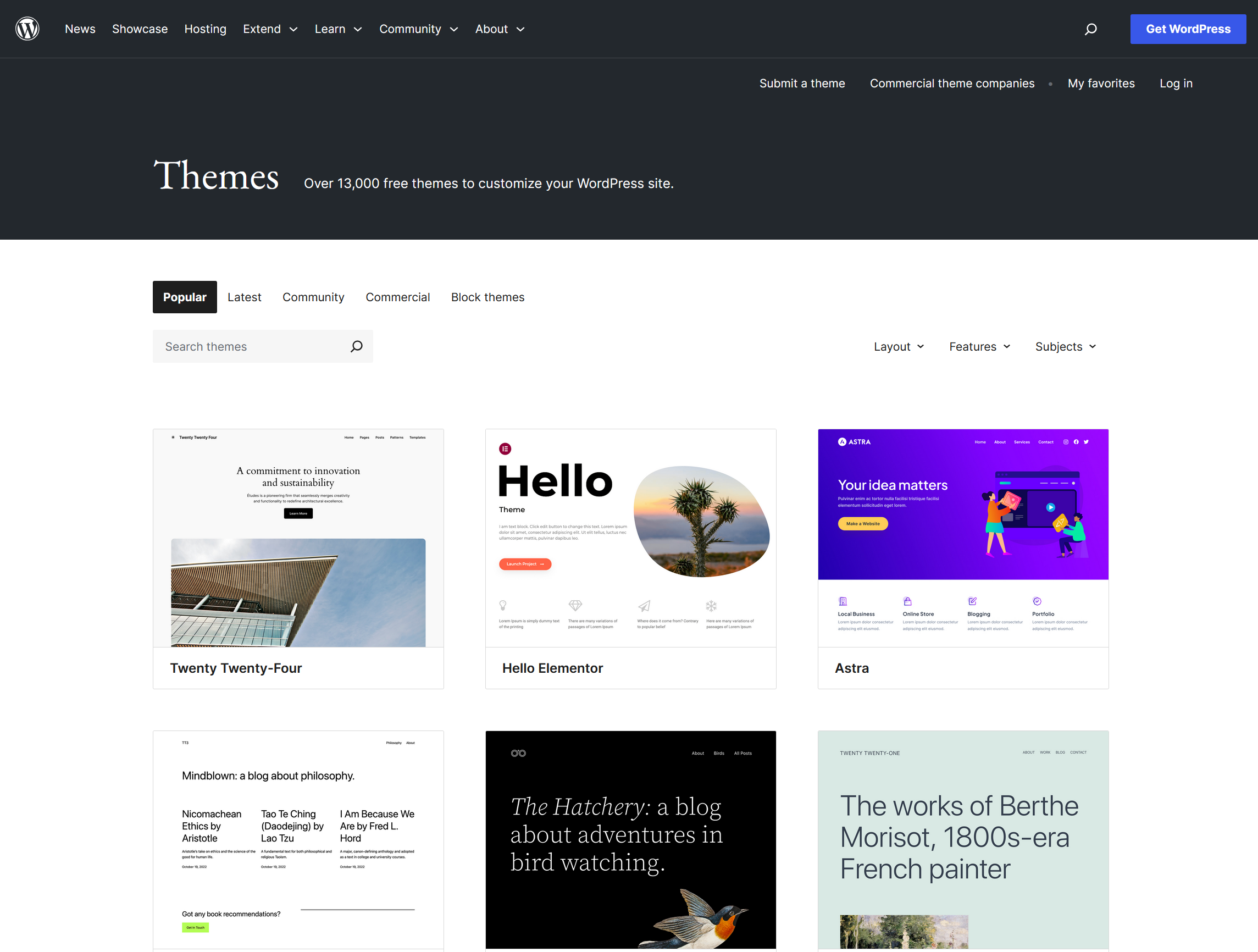
  1. A New Theme: Maybe you’ve spotted something you like in the official directory, like the popular Astra theme.
  2. A Page Builder: Tools like Elementor or Oxygen Builder are great if you’d prefer to stay away from coding.
  3. New Plugins: These can add some cool features to your site.

Picking the right theme is important, considering factors such as brand identity, target audience, and desired functionality.

Ensure the new theme is compatible with your content and plugins. Although it can be time-consuming, redesigning your site can lead to a better user experience and increased conversions.

So, the big question is whether you need to have graphic mockups for your website redesign. Well, the answer depends on your approach:

  1. If you’re planning to create your own Custom Theme, then definitely yes. You’ll need to design your website from scratch, which means visualizing all the graphic elements clearly.
  2. If you’re going to use and tweak an Existing Theme, then mockups aren’t necessary. This is a simpler route. Just make sure to pick a new theme that aligns with your goals.

Step 3. Focus on Usability and Accessibility.

Make sure that your new design is user-friendly, easy to navigate, and optimized for mobile devices.

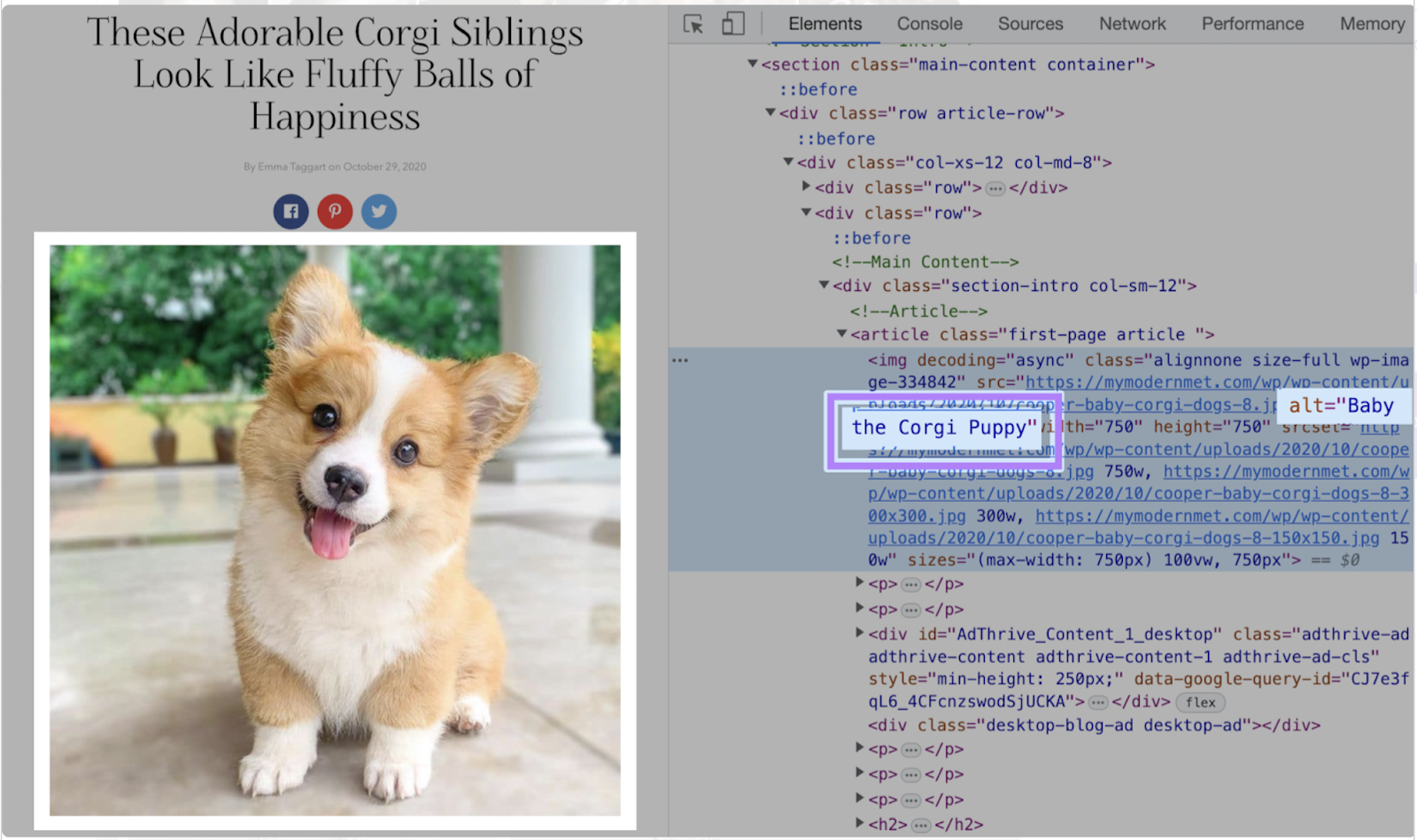
Image from https://www.semrush.com/blog/check-website-accessibility

Accessibility considerations such as font size, color contrast, and keyboard navigation are also important to ensure that your site is accessible to all users, including those with disabilities.

Step 4. Test-driving redesigned WordPress website.

Another question is how to implement and test the new design of your WordPress website. Here we have 2 approaches.

Option 1. Use a local host.

For now, the best option for localhost is localwp. (Not an advertisement).

  1. Grab your data from the hosting with any WP migration plugin
  2. install a new WordPress website on your localhost
  3. and import the current site content to it.

You may include all the pages, menus, posts, WP-theme, and media content to have a local version of your website.

But remember that you may have a large file with the exporting data, and the import can be time-consuming.

Then you can use and test your new theme and see, how it works with your website content.

Option 2. Use the beta or test folder on your live hosting.

You can install another WordPress on your hosting inside any other folder and even connect your current WordPress database to the new WP testing site.

You can use a subdomain for that too. How easy it to do depends on your hosting-provider.

Just don’t forget to check Encourage/Discourage Google to Index your WordPress Site in the settings and protect the content with password.

Then you can export your theme as a zip file and import it to an existing live website, preview it inside your admin panel and make it live.

More info you can find here.

Step 5. Thoroughly test your new design and performance before launch.

Finally, it’s important to test your new design thoroughly before launching it to the public on local server on inside hidden directory of your live site.

After launch, use tools such as Google Analytics to measure the impact of your changes and make adjustments as needed.

– – –

By following these steps, you can redesign your WordPress website in a short period while still achieving your goals and ensuring a high-quality user experience.

Redesign a WordPress website in five straightforward steps, it’s all about planning, choosing the right theme, customizing your design, testing functionality, and finally, going live. Remember, a website redesign isn’t just about making things look fresh; it’s an opportunity to enhance user experience and better align with your goals. So take your time, enjoy the process, and watch your site transform into something even more amazing.

Happy redesigning!

Looking for a professional service to redesign your WordPress website?

Choose FastRedesign for a fast, high-quality WordPress website redesign. Our team has extensive experience in creating visually appealing and user-friendly sites that align with your brand’s goals and objectives. We specialize in WordPress themes update, offering turnkey solutions to quickly and efficiently redesign your site. Our focus on usability and accessibility ensures that your site is optimized for mobile devices and accessible to all users. Contact us or Test your Website Relevance.

FAQ

Still have a question?

If you have any other queries, feel free to reach out to us. Our knowledgeable team is here to help! Contact us.

Harness the power of user experience (UX) research with these practical techniques and tips to get you on your way to more effective UXR.

UX research helps to improve the user experience of digital products by understanding the needs and behaviors of target customers. Using this research data, you can create designs that better meet their needs, address potential pain points, and eliminate confusion. Learn how to utilize UX research methods and get helpful tips for uncovering valuable user insights.

UX Research - Maintain Ethical Standards and Informed Consent Protocols.

So, here the list of the Best Practices for effective user experience research:

  • Define clear research goals and objectives
  • Identify and recruit the right participants
  • Use a variety of research methods
  • Keep the user at the center of your research
  • Iterate and test early and often
  • Be flexible and open to unexpected findings
  • Communicate findings effectively
  • Ensure your research is inclusive and accessible

1. Define clear research goals and objectives

Clear goals and objectives also help UX researchers to determine the appropriate research methods and techniques, recruit the right participants, and analyze the results accurately. Overall, defining clear UX research goals and objectives is essential for conducting research that informs and guides the design and development of user-friendly and effective products and services.

2. Identify and recruit the right participants

The right participants provide insights into how to design products that meet their needs. UX researchers need to define the user group’s profile and select participants who match that profile. Also, participants must be willing, provide relevant feedback, and be representative of the target group. Gathering valuable data and insights informs the design and development of user-centered products.

3. Use a variety of research methods

Some of the most common research methods include surveys, interviews, focus groups, case studies, experiments, observational studies, and content analysis. There are a lot of research methods that can be used for any project depending on the research question, resources available, and other factors.

4. Keep the user at the center of your research

That means prioritizing the user’s needs, preferences, and experiences throughout the research process. It involves designing research questions, methods, and data analysis to understand and meet the user’s needs better. By keeping the user at the center of research, it ensures that the research focuses on creating user-centered products and services that improve the user’s experience.

5. Iterate and test early and often

By testing early and often, designers can identify potential problems and make necessary changes before they become more difficult and costly to fix. This process involves creating prototypes and testing them with users to gather feedback and insights. The design is then refined, and the process repeats until the final product is achieved. After all, designers can ensure that the final product meets the user’s needs, preferences, and expectations. It’s also a great practice to reduce the risk of developing a product that doesn’t work or doesn’t appeal to the target audience.

6. Be flexible and open to unexpected findings

Unexpected findings can arise during UX research, challenging previously held assumptions or providing new insights. For instance, users’ priorities and needs may differ from what was assumed, users may not use features as intended, users can have strong emotional reactions to design elements, and there can be differences in behavior across user groups. These findings can be both challenging and enlightening, providing valuable insights into user behavior and preferences. By embracing these unexpected findings, designers can create better-designed products and experiences.

7. Communicate findings effectively

To communicate UX research findings effectively, it is important to know your audience, focus on key takeaways, use visual aids, tell a story, provide context, and follow up. By tailoring your communication to your audience, highlighting important insights, using visuals, providing examples, explaining the research methods used, and following up with stakeholders, you can ensure that the insights gained from UX research are understood and acted upon.

8. Ensure your UX research is inclusive and accessible

To ensure that UX research is inclusive and accessible, there are several steps you can take. First, recruit a diverse group of participants to ensure that the insights gained are representative of a wide range of users. Second, provide multiple ways for participants to provide feedback, such as through surveys, interviews, or usability tests, to ensure that participants with different abilities and preferences can participate. Third, provide accommodations such as sign language interpreters or alternative formats for participants with disabilities. Fourth, ensure that research materials are accessible, such as using plain language, providing transcripts or captions for audio and video content, and ensuring that research tools and platforms are accessible to participants with disabilities. Lastly, continually evaluate and improve your research methods to ensure that they are inclusive and accessible to all users.

Know Your UX research Goals. Always

Before you start, set clear and measurable goals for your research. What questions do you want answered? What are the specific user behaviors or outcomes that you’re trying to measure? Setting these tangible objectives will shape your research process, determine the methods you select, and provide more useful results.

Maintain Ethical Standards and Informed Consent Protocols

As you conduct your research, it’s important to keep ethical considerations in mind. This starts with documenting informed consent from your research participants. You should clearly explain the purpose of the study, what data you’ll be collecting, and how their information will be used and stored. Respect user privacy and ensure that all data is secure throughout the duration of the project.

Conclusion

To sum up, the importance of UX research cannot be overstated. By following best practices such as defining clear objectives, selecting appropriate methods, involving stakeholders, and prioritizing user needs, companies can create successful and effective user experiences. UX research should be integrated into all stages of product development, from ideation to post-launch evaluation, to continuously gather feedback and improve user satisfaction.

What to choose for website update – revamp or redesign?

This article will be useful to those who already know that their site or service needs changes. And they also understand that these changes will lead to increased growth and increased conversions.

Deciding to upgrade, you are faced with the question of which change plan to choose for your site or service. The decision to completely redesign your company’s website can be difficult. Sometimes multiple decision-makers vie for their word, maybe your web designers are pushing for a redesign. Or perhaps you just know it’s a little outdated but not sure if it’s old enough to warrant a new design.

We wrote a previous post describing why you should redesign your website and not go into details this time.

We want to talk about the difference between a redesign and an update. While both approaches give your website a fresh look, they accomplish two different goals – each has its own pros and cons.

What should you choose to revamp or redesign, which will be more rational in your particular case? We will try to answer this question for you in our article.

Revamp or redesign? Let's choose

Design vector created by stories – www.freepik.com

Permanent or temporary?

First, when we talk about a website redesign, we mean a complete website redesign. Evaluating its navigation, its design, and its call-to-action is really all that could be overestimated to provide a more effective user experience.

After the revamp, your website’s structure may remain the same, or perhaps some new pages, corporate colors, etc., may be added. It’s about giving your website a more modern look and tweaking a few things to make it work better or served a specific purpose. For example, in the winter, we are revamping some of our e-commerce websites with a Christmas theme to keep customers in a festive mood. This is a temporary update and will be back to normal in the spring.

Website Revamp

Revamp is suitable for those sites where the structure, functionality, and appearance are in order and do not require intervention. But the content and (flow replace) requires changes and does not correspond to the current requirements.

In fact, revamp is an interface update that will make your site fresh and provide the user with relevant information about your services. As a result, you can change your site’s look to make it look fresh, new, branded, and more attractive to your users.

These changes include uploading new logos, updating the color scheme, and replacing all existing photos with fresh stock images. You can also edit your website’s content and add up to 1000 words to the additional content page if needed.

The website update will improve your online presence overall value and design, keeping most of the structure in place and making significant cosmetic improvements. And so, if the UI / UX-design of your site does not need changes, and you want to achieve an increase in conversion and improvement in SEO rankings. In this case, you should consider the revamp service.

Benefits of revamp

  • Fees (Cost): The price for a site revamp will be significantly lower than for a redesign. / renovation can be cheaper, especially in the short term (for example, if you want to update the colors of a replaced logo). The average cost of an update in our company is $ 1400, depending on the site’s complexity.
  • Lead-time: It will take less time since only content and web elements will be updated. The structure of the website remains unchanged. / Generally, it takes much less time to update a website than a complete update. In our company, you can update your website within three weeks on average.
  • Content Structure: The content structure does not change. In most cases, the CMS and all navigation menus, header, and footer will remain the same as before the revamp procedure.
  • Familiarity: Website revamp is excellent for keeping your site structure consistent so that regular users of your site know where to go to get the information they need.
    Effectiveness: If your website really works for you in terms of visitors and conversions, then why fix it rather than refresh its “feel”?

Disadvantages of revamp

Revamp is not appropriate in all situations – two main reasons:

  • Since this approach is time-dependent, developers may need additional time to complete the project.
  • This approach is purely cosmetic and will be limited to the existing site structure.

When do we recommend a website revamp?

Website revamp works well when the existing site has a good user flow structure. This way, we can give the site a completely fresh look while leaving most of the structure as it is. Website revamp is also an affordable solution for customers who need to update their website but don’t have the budget for bulk changes.

Website Redesign

Think of a complete redesign as building a new building from scratch. We start from scratch to create a custom website that better suits your day-to-day needs and completely reimagines your original website’s functionality and design.

The redesign is suitable for small businesses for small-scale changes and for large players who want to find and fix all the negative elements in their web projects.

For small sites, redesign suggests changing the user interface, following modern UI / UX trends and rules. As well as bringing the site to technical norms and standards. SEO optimization is also being carried out.

A large-scale project redesign offers the most extensive research from software product tests (hot cards, etc.) to an individual audit of a company to identify a specific problem, reasons for a decrease in conversion, or an obstacle to its growth.

Benefits of redesign

  • Start Over: With a website redesign, you have complete freedom to start over and create a stunning new website without having to stick with previous layouts etc.
  • Instead of wasting time troubleshooting problems, we design your website correctly from the start.
  • The redesign requires additional research and design to create a more personalized end product.
  • The design will be completely different from your current site.
  • Cost: Sometimes, a major overhaul is a long-term money-saving. This can allow you to start over with modern technology instead of going back to the web designer repeatedly for further updates. For example, you can redesign your site using a CMS and hand over the maintenance of your site to your own hands.
    In FastRedesign, a complete website redesign costs starting from $ 3,000. The final price depends on the number of pages, useful content, quality of graphics, and the need to create additional digital elements.
  • Standards: Imagine your website was made a few years ago. Most likely, it will be in tables and may not be the most accessible of the sites. A website redesign can mean redesigning a CSS, validating the site to professional web standards, and making it accessible to everyone at a basic level.
  • Effectiveness: Are you tracking visits and conversions to your website? Do you know the site is working for you? If not, then this is an excellent opportunity to evaluate the site, see what works and what doesn’t, and redesign the new website based on your findings. After all, if that doesn’t work for you, why stick with a bad design or layout?

Disadvantages of redesign

Reasons to hold back – a complete redesign isn’t for everyone.

  • It is more expensive than renovation.
  • The process takes longer.
  • If the customer wants to add pages or features not included in the original contract, the contractor will have to provide additional bids.

We recommend completely redesigning the site in the following cases:

  • The brand has changed significantly.
  • The existing site structure is poorly designed or constructed.
  • The time it takes to update a website exceeds the cost of a complete redesign. Redesigning large e-commerce websites is often more expensive than a complete redesign.
  • The client prefers to build from scratch.

So, what to choose – revamp or redesign?

When you think of a new website, think about these points to decide if you need to redesign your site or be just as effective with this update.

  • What do you like or dislike about your website right now?
  • Is there something wrong with the design, or are you just tired of branding?
  • What are you hoping to achieve, and what do you think visitors will get from visiting your website?
  • Is your current site working and converting for you?
  • What are your future goals for the site?
  • Is your branding changing and therefore forcing it to redesign?
  • Does it meet all the standards you need (is it available)?

Conclusion

Whether you opt for a website refresh or a complete website overhaul, you will be out of the process with an updated website that you will be proud of.

If you have further questions about the FastRedesign web design process, we would like to talk more detail. Together we will create something beautiful. Get started today by contacting us!

FastRedesign is a 100% Remote team and our services are unaffected by COVID-19

Web and UX design services
provided by Cheniteli OÜ
Kesklinna linnaosa, Tartu mnt 67/1-13b, 10115
Tallinn, Estonia

Verified agency on DesignRush
GoodFirms Badge